Syncing Reading Position & Highlights
The plugin keeps two things in sync between your devices and the BookFusion cloud: your reading position and your highlights. Once a book is downloaded on more than one device, you can pick up exactly where you left off, and your highlights travel with you.
What Syncs
- Reading position — resumes where you left off, regardless of which device you last read on.
- Highlights — pushed to and pulled from BookFusion, and visible across all your connected devices and the BookFusion apps.
Only reading position and highlights sync today. See Troubleshooting & FAQ for the full scope.
Manual Sync
From Tools → BookFusion you can sync on demand:
- Push reading position — sends your current position from this device up to BookFusion.
- Fetch reading position — pulls the latest position from BookFusion onto this device.
- Sync highlights now — pushes and pulls highlights for the open book.
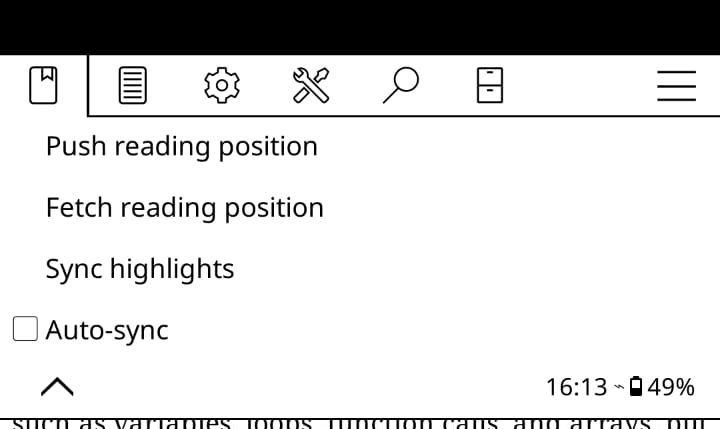
Manual sync is handy before you switch devices, or any time you want to be certain a change has been saved.
Auto-sync
Turn on Auto-sync in the BookFusion menu to sync automatically in the background. With auto-sync enabled, the plugin will also fetch updates when you resume or unlock your device, so a book is up to date by the time you open it.
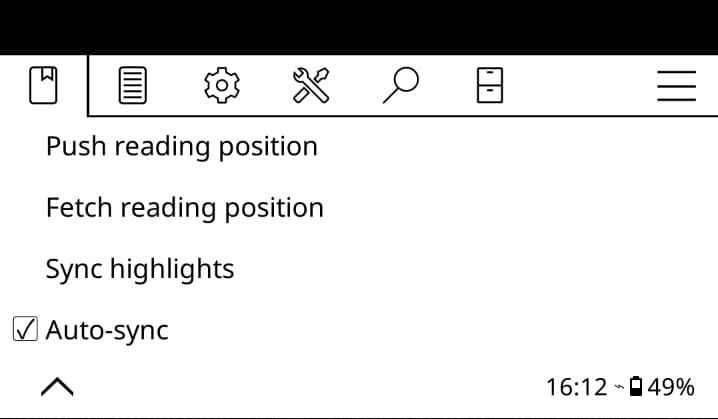
Let one device finish syncing before you open the same book on another. Opening a book on a second device while the first is still syncing can occasionally cause the position to jump. See Troubleshooting & FAQ.